

 Free toolbox talk · TBT-152
Download the free toolbox talk
The one-page talk, editable Word version, and guidance below are open to everyone. No account required.
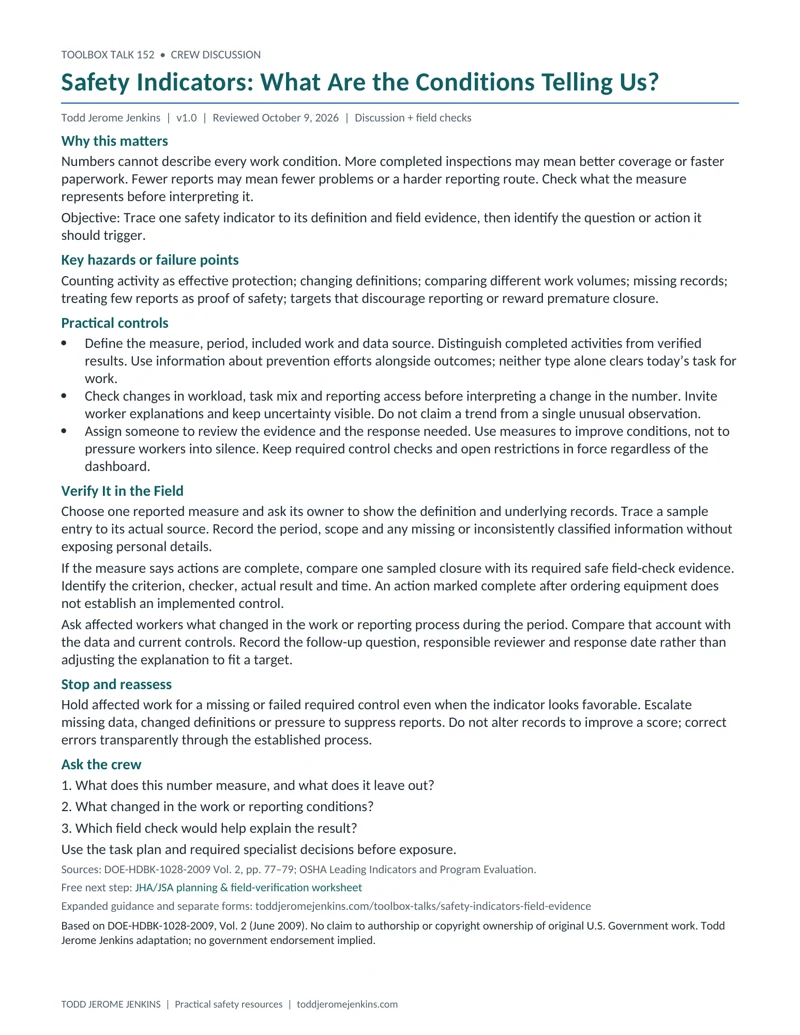
Toolbox Talk - Using Safety Indicators to Learn
Download toolbox talk - using safety indicators to learn (PDF, 1 page)Editable toolbox talk - using safety indicators to learn (Word)Preview the one-page toolbox talk
Supporting documents
Supervisor field checks and attendance records are included with a free account. No payment is required.
Supervisor Field Check - Using Safety Indicators to Learn
A separate check to verify conditions and controls before work. Includes a one-page PDF and editable Word file.
Attendance Sheet - Using Safety Indicators to Learn
A separate sign-in sheet to record the toolbox talk. Includes a one-page PDF and editable Word file.
Need the crew records? Create a free account to use these supporting documents and Jenkins Academy of Applied Technology. No payment is required. Email updates are optional.
Create Free AccountAlready have an account? Sign in
HOP skills practice • Batch 5, topic 28 of 52. A 5–10 minute toolbox talk plus time for actual field verification. One-page PDF and editable Word talk; separate supervisor and attendance forms.
What is this skill?
A safety indicator is information used to monitor a condition or outcome and guide a response.
Why use it?
A green dashboard can hide weak controls when it counts activity without examining results.
When should we use it?
When reviewing trends, choosing improvement priorities or evaluating a change.
Where does it apply?
At team reviews, planning meetings and the work locations represented by the data.
Learning objective
Explain what one indicator shows, what it misses and what field evidence is needed.
Key hazards or failure points
Changing definitions; missing context; rewarding silence; treating a single point as a trend.
How to use it — practical controls
- Define the question, data source, period and what is included or excluded.
- Compare outcomes with information about preparation and control condition. Ask workers what the numbers miss.
- Investigate the signal and record a response; use appropriate analytical expertise for trend claims.
Verify It in the Field
- Trace a selected record to actual work and current control evidence. Dashboard status cannot release a task.
- Paper practice: all corrective actions say closed, but one has no effectiveness result. Identify the limitation.
- Propose a follow-up that studies whether the correction works, not just whether a form was filed.
For real work, record the control, governing source and criterion, safe method, authorized checker, actual result and time. Mark VERIFIED, HOLD/NOT VERIFIED, or N/A with a reason. A practiced skill or matching label does not demonstrate that a physical safeguard functions. Do not create exposure to complete a check.
Stop and reassess
Do not rely on data with unclear definitions or missing records. Hold work independently when required protection is unverified.
Toolbox talk questions
- What does this number leave out?
- Could our target discourage reporting?
- Which field evidence would challenge the dashboard?
Examples across different work settings
These are original teaching examples, not operating instructions. Use paper, photographs or inert training items for practice. Change the setting to fit your team while retaining the skill steps and the applicable task requirements.
Delivery operations
Fewer hazard reports follow a reporting-system change. The team checks access and user experience before interpreting the reduction as safer work.
Assembly
A maintenance completion indicator improves. A field sample finds an unresolved control issue, so the team examines what completion means.
Professional services
Training attendance is high, but workers cannot find the emergency instructions. The team distinguishes attendance from usable knowledge and access.
Practice the skill and understand its limits
Use a fictional table with two reporting periods and a changed definition. Ask whether comparison is justified. Then identify information needed to interpret the change. Leading indicators can inform prevention; they do not guarantee or precisely predict future outcomes.
Leader follow-through — improve the conditions
Choose a small useful set of indicators, retain consistent definitions and revisit unintended incentives. Use numbers to ask better questions.
Short supervisor field check
- Indicator question and definition are clear.
- Period, coverage and missing data are identified.
- Worker context informs interpretation.
- A sample is traced to actual control evidence.
- Response and review owner are recorded.
Use the separate supervisor sheet to retain evidence, open items, correction owner, recheck result and required restart authority. Keep task-specific permits, inspections and technical decisions in their established process.
Attendance and follow-through
Use the separate attendance sheet for participants, roles, questions, actions and rebriefs. Attendance does not establish competence, verify a control or authorize work. Keep completed records private under employer procedures.
Source acknowledgment
Based on DOE-HDBK-1028-2009, Vol. 2 (June 2009). No claim to authorship or copyright ownership of original U.S. Government work. Todd Jerome Jenkins adaptation; no government endorsement implied. Explanations, examples, practice exercises and layouts are original adaptations. Third-party material credited in the handbook retains its original attribution; this notice does not claim rights in that material.
Source file inspected: Volume 2/VOLUME 2 PERFORMANCE INDICATORS.pdf; printed pages 77–79. Historical injury-rate examples, fixed scoring schemes and deterministic predictions are excluded.
Technical scope and references
References reviewed October 13, 2026. DOE human-performance tools and OSHA recommended practices support preparation and discussion; they do not establish universal technical acceptance criteria. Apply the current task procedure, manufacturer instructions, permit and required competent or qualified decisions. A successful exercise does not replace required training, technical verification or work authorization.
- DOE-HDBK-1028-2009, Volume 2 — Performance Indicators, printed pp. 77–79 — June 2009 illustrative measurement guidance. Historical rates, fixed scoring examples and deterministic predictions omitted.
- OSHA — Leading Indicators — Current overview of preventive indicators and past-outcome measures; indicators do not replace task-level verification.
- OSHA — Program Evaluation and Improvement — Current recommended practices on collecting, reviewing and sharing indicators with worker involvement.
The DOE handbook is June 2009 illustrative guidance, not a current requirements document. Availability of the official edition and the linked supporting guidance was checked October 13, 2026. Apply current task-specific requirements, manufacturer instructions, permits and required competent or qualified decisions; this talk supplies no universal technical acceptance criteria.
Connect this discussion to your JHA/JSA
Use the JHA/JSA planning and field-verification worksheet to record the actual task steps, hazards, responsible roles and controls. Return to What Changed Today? when the plan or conditions change.
Related Todd Jerome Jenkins articles: How to Conduct a Job Safety Analysis and What Is Human and Organizational Performance?.
Related toolbox talks
Practice another HOP skill
- Toolbox Talk - Prioritizing Safety Improvement Gaps
- Toolbox Talk - Self-Assessment of Real Work
- Toolbox Talk - Learning from Incident Context
- Toolbox Talk - Questioning the Work Plan
One next step
Use the free JHA/JSA planning and field-verification worksheet linked above to apply this skill to one actual task step. Record what must be checked before exposure and who will check it.