

 Free toolbox talk · TBT-173
Download the free toolbox talk
The one-page talk, editable Word version, and guidance below are open to everyone. No account required.
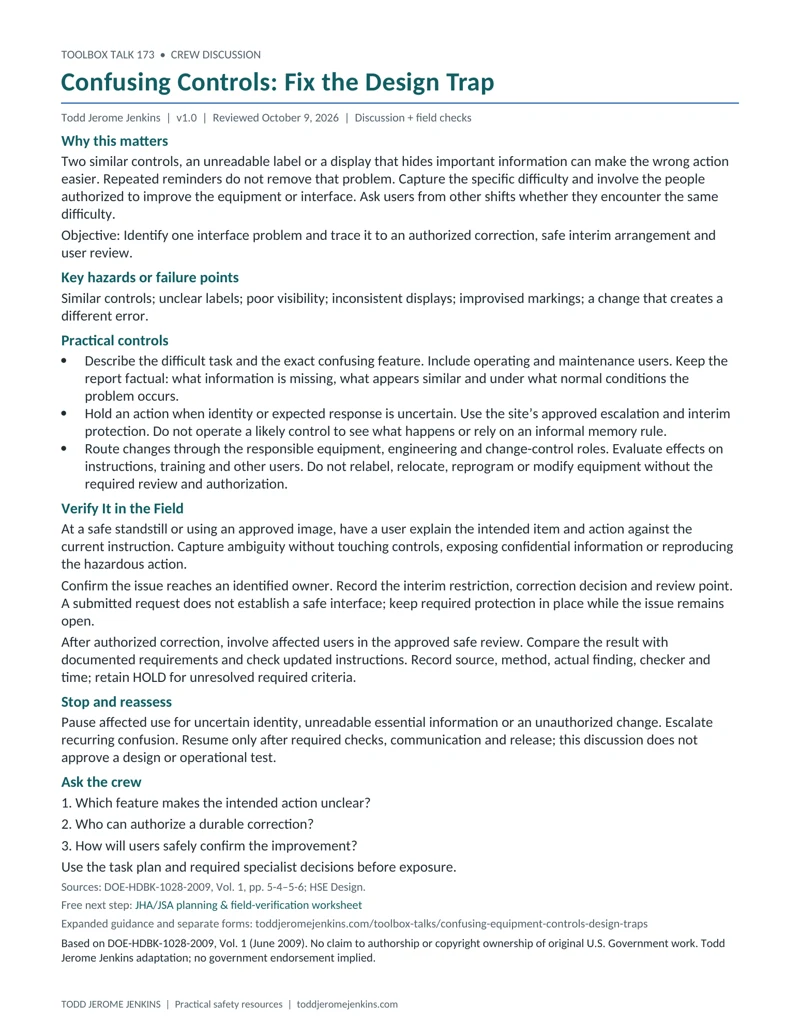
Toolbox Talk - Recognizing Confusing Controls
Download toolbox talk - recognizing confusing controls (PDF, 1 page)Editable toolbox talk - recognizing confusing controls (Word)Preview the one-page toolbox talk
Supporting documents
Supervisor field checks and attendance records are included with a free account. No payment is required.
Supervisor Field Check - Recognizing Confusing Controls
A separate check to verify conditions and controls before work. Includes a one-page PDF and editable Word file.
Attendance Sheet - Recognizing Confusing Controls
A separate sign-in sheet to record the toolbox talk. Includes a one-page PDF and editable Word file.
Need the crew records? Create a free account to use these supporting documents and Jenkins Academy of Applied Technology. No payment is required. Email updates are optional.
Create Free AccountAlready have an account? Sign in
HOP skills practice • Batch 6, topic 50 of 52. A 5–10 minute toolbox talk plus time for actual field verification. One-page PDF and editable Word talk; separate supervisor and attendance forms.
What is this skill?
This skill identifies design features that make the intended action unclear and routes them for authorized improvement.
Why use it?
Two similar controls, an unreadable label or a display that hides important information can make the wrong action easier. Repeated reminders do not remove that problem. Capture the specific difficulty and involve the people authorized to improve the equipment or interface. Ask users from other shifts whether they encounter the same difficulty.
When should we use it?
When labels, displays or neighboring controls cause hesitation or repeated selection concerns.
Where does it apply?
At equipment, software interfaces and workstations, using safe observation or approved training images.
Learning objective
Identify one interface problem and trace it to an authorized correction, safe interim arrangement and user review.
Key hazards or failure points
Similar controls; unclear labels; poor visibility; inconsistent displays; improvised markings; a change that creates a different error.
How to use it — practical controls
- Describe the exact feature and conditions causing confusion. Include operating and maintenance users.
- Hold uncertain actions and use approved interim protection. Do not try a likely control to discover its function.
- Route design changes through the authorized owner. Update affected instructions and training after approved correction.
Verify It in the Field
- Use a fictional screen with two similar labels. Ask users what information they need; do not test them on live controls.
- Record the real ambiguity from safe access and confirm an owner and interim restriction. A submitted request is not a correction.
- After authorized change, involve users in the approved review. Record governing criteria, safe checks, findings and release status.
For real work, record the control, governing source and criterion, safe method, authorized checker, actual result and time. Mark VERIFIED, HOLD/NOT VERIFIED, or N/A with a reason. A practiced skill or matching label does not demonstrate that a physical safeguard functions. Do not create exposure to complete a check.
Stop and reassess
Pause affected use for uncertain identity, unreadable essential information or an unauthorized change. Escalate recurring confusion. Resume only after required checks, communication and release; this discussion does not approve a design or operational test.
Toolbox talk questions
- Which feature makes the intended action unclear?
- Who can authorize a durable correction?
- How will users safely confirm the improvement?
Examples across different work settings
These are original teaching examples, not operating instructions. Use paper, photographs or inert training items for practice. Change the setting to fit your team while retaining the skill steps and the applicable task requirements.
Customer support
Adjacent software actions have similar labels but different effects. A mock screen allows users to explain the ambiguity without altering real accounts.
Equipment operation
Two identifiers are hard to distinguish from the working position. The issue goes to the equipment owner; workers do not invent new labels or operate controls to confirm identity.
Facilities
A display is difficult to read under normal lighting. The review includes users from different shifts and the maintenance role before a change is approved.
Practice and discuss
Draw two fictional buttons labeled “Send copy” and “Send final.” Ask what the user needs to know before selection and what a useful design review should consider. Avoid scoring who selects fastest. Record how the interface presents identity, status and consequences.
Leader follow-through — improve the conditions
Treat recurring confusion as information about work design. Include accessibility, actual viewing conditions and maintenance tasks in the responsible review. This talk prescribes no universal color, spacing or label-size specification.
Short supervisor field check
- Exact interface difficulty documented.
- Affected action safely restricted as needed.
- Design owner and interim arrangement confirmed.
- Authorized review includes affected users.
- Instructions, findings and release status updated.
Use the separate supervisor sheet to retain evidence, open items, correction owner, recheck result and required restart authority. Keep task-specific permits, inspections and technical decisions in their established process.
Attendance and follow-through
Use the separate attendance sheet for participants, roles, questions, actions and rebriefs. Attendance does not establish competence, verify a control or authorize work. Keep completed records private under employer procedures.
Source acknowledgment
Based on DOE-HDBK-1028-2009, Vol. 1 (June 2009). No claim to authorship or copyright ownership of original U.S. Government work. Todd Jerome Jenkins adaptation; no government endorsement implied. Explanations, examples, practice exercises and layouts are original adaptations. Third-party material credited in the handbook retains its original attribution; this notice does not claim rights in that material.
Source file inspected: Volume 1/VOLUME 1 CHAPTER 5 - HUMAN PERFORMANCE EVOLUTION INTRODUCTION.pdf; printed pages 5-4–5-6. Third-party historical case wording, quotations and diagrams are excluded. Original interface exercise; no technical design criteria invented.
Technical scope and references
References reviewed October 13, 2026. DOE human-performance tools and OSHA recommended practices support preparation and discussion; they do not establish universal technical acceptance criteria. Apply the current task procedure, manufacturer instructions, permit and required competent or qualified decisions. A successful exercise does not replace required training, technical verification or work authorization.
- DOE-HDBK-1028-2009, Volume 1 — Chapter 5, printed pp. 5-4 through 5-6 (PDF pages 4–6); June 2009 conceptual background only. Selected chapter pages read; full chapters were not reviewed.
- HSE — Design — Why design matters and key principles: user involvement, operability, maintainability and foreseeable conditions. UK guidance, not universal technical design criteria.
The DOE handbook is June 2009 illustrative guidance, not a current requirements document. Availability of the official edition and the linked supporting guidance was checked October 13, 2026. Apply current task-specific requirements, manufacturer instructions, permits and required competent or qualified decisions; this talk supplies no universal technical acceptance criteria.
Connect this discussion to your JHA/JSA
Use the JHA/JSA planning and field-verification worksheet to record the actual task steps, hazards, responsible roles and controls. Return to What Changed Today? when the plan or conditions change.
Related Todd Jerome Jenkins articles: How to Conduct a Job Safety Analysis and What Is Human and Organizational Performance?.
Related toolbox talks
Practice another HOP skill
- Toolbox Talk - Shared Dependencies Between Controls
- Toolbox Talk - Understanding Control Functions
- Toolbox Talk - Resolving Schedule and Safety Conflicts
- Toolbox Talk - Recovery Readiness
One next step
Use the free JHA/JSA planning and field-verification worksheet linked above to apply this skill to one actual task step. Record what must be checked before exposure and who will check it.